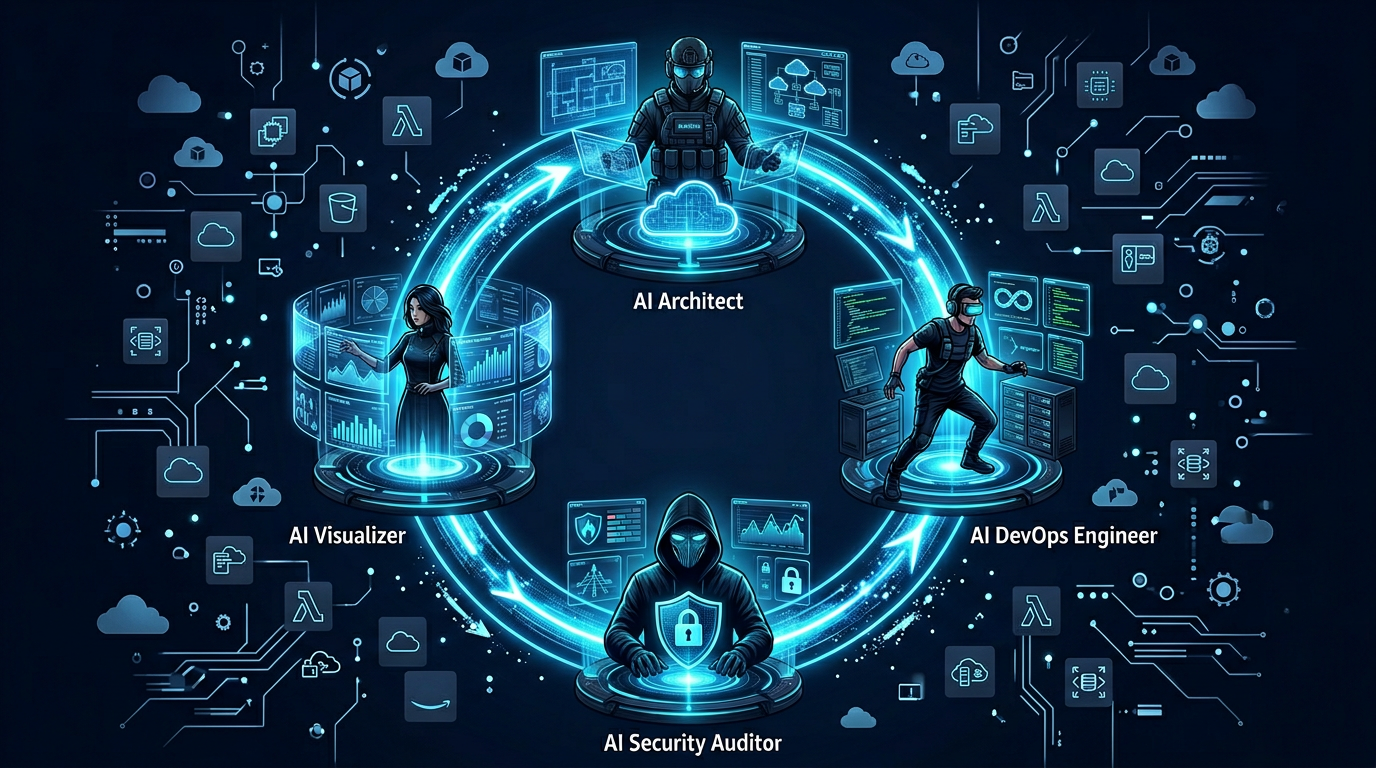
We Built a Multi-Agent System That Designs AWS Infrastructure, Writes Terraform, and Audits Its Own Security - From Plain English
Designing cloud infrastructure from scratch involves at least three people and three separate conversations: an architect to pick the services, a DevOps engineer to write the Terraform, and a security engineer to review it. Then someone has to draw the diagram - which will be out of date the moment the architecture changes.
We asked a different question: what if all four of those roles ran as agents in a single, automated pipeline?
The result is InfraSquad. Type your infrastructure requirements in plain English. Get back deployable Terraform HCL, a security audit with specific remediation guidance, and a rendered architecture diagram - in one shot.
TL;DR - InfraSquad is an open-source multi-agent system built on LangGraph. Four specialized agents (Product Architect, DevOps Engineer, Security Auditor, Visualizer) collaborate in a cyclic state machine. Security findings loop back to the DevOps agent for remediation, capped at three cycles to prevent infinite loops. External scanning runs via an MCP server using tfsec or checkov, with graceful fallback to LLM review. The entire stack is Python, runs locally, and costs nothing beyond your LLM API calls.
The GitHub repo is at Andela-AI-Engineering-Bootcamp/infrasquad.
Meet the Squad
Before diving into the machinery, here’s what each agent is responsible for:
| Agent | Role | What It Produces |
|---|---|---|
| Product Architect | Analyzes your requirements, considers scale/compliance/cost | A structured, numbered AWS architecture plan |
| DevOps Engineer | Translates the plan into deployable code; remediates security findings | Valid Terraform HCL targeting AWS |
| Security Auditor | Scans the Terraform via MCP (tfsec/checkov) or LLM fallback | A structured JSON security report with severities and recommendations |
| Visualizer | Reads the final plan and code | A Mermaid.js architecture diagram, rendered to PNG |
These agents don’t just run sequentially and exit. The Security Auditor can send the DevOps Engineer back to fix its own code. The DevOps Engineer can loop up to three times before the pipeline moves on regardless. That cyclic behavior is the core engineering challenge - and why we chose LangGraph.
The State Machine
The entire workflow is a LangGraph StateGraph - a directed graph where nodes are agent functions and edges are conditional routing rules. All agents share a single AgentState TypedDict:
class AgentState(TypedDict, total=False):
    messages: Annotated[list, add_messages]
    user_request: str
    architecture_plan: str
    terraform_code: str
    security_report: dict[str, Any]
    security_passed: bool
    diagram: str
    diagram_image_path: str
    remediation_count: int
    hcl_remediation_count: int
    hcl_validation_errors: list[str]
    is_infrastructure_request: bool
    is_followup: bool
    current_phase: str
    error: str | None
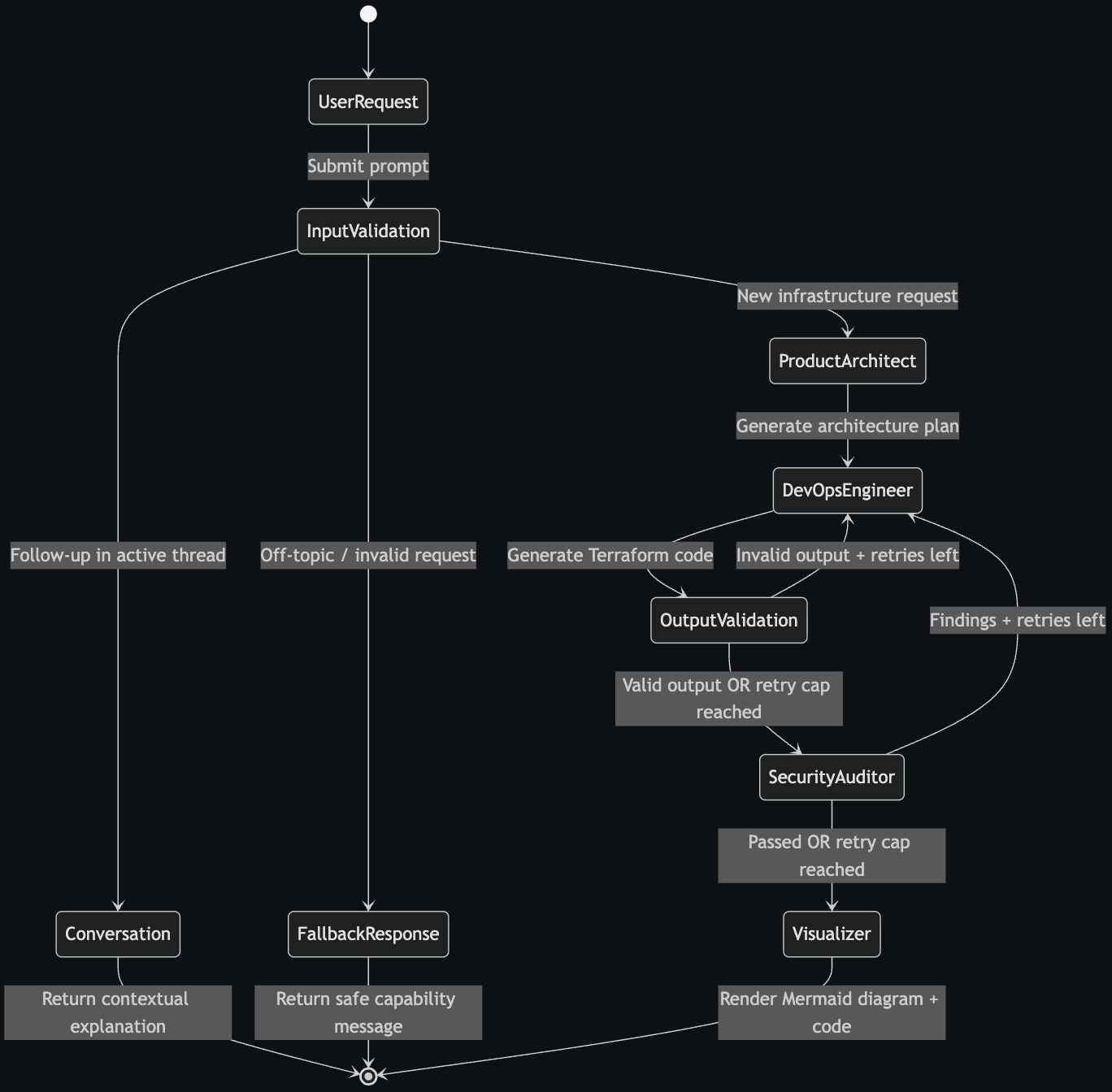
The graph has three possible entry paths after input validation:
validate_input ──► architect ──► devops ──► validate_output ──► security ──► visualizer ──► END
               │                    ▲              │  (loop)         │  (loop)
               ├──► fallback ──► END └─────────────┘                └──────────────┘
               └──► conversation ──► END
New infrastructure request? Full pipeline. Follow-up question about something already generated? The conversation node handles it contextually. Off-topic? Polite refusal via fallback.
The graph compilation is straightforward:
def build_graph(checkpointer: Any = None) -> CompiledStateGraph:
    graph = StateGraph(AgentState)

    graph.add_node("validate_input", validate_input_node)
    graph.add_node("conversation", conversation_node)
    graph.add_node("fallback", fallback_node)
    graph.add_node("architect", architect_node)
    graph.add_node("devops", devops_node)
    graph.add_node("validate_output", validate_output_node)
    graph.add_node("security", security_node)
    graph.add_node("visualizer", visualizer_node)

    graph.set_entry_point("validate_input")

    graph.add_conditional_edges(
        "validate_input",
        route_after_validation,
        {"architect": "architect", "conversation": "conversation", "fallback": "fallback"},
    )
    graph.add_edge("architect", "devops")
    graph.add_edge("devops", "validate_output")
    graph.add_conditional_edges("validate_output", route_after_output_validation,
                                {"security": "security", "devops": "devops"})
    graph.add_conditional_edges("security", route_after_security,
                                {"visualizer": "visualizer", "devops": "devops"})
    graph.add_edge("visualizer", END)

    return graph.compile(checkpointer=checkpointer)
The checkpointer parameter accepts a LangGraph saver (we use SqliteSaver) for multi-turn conversation persistence. Pass None to get a stateless graph - useful for tests.
Input Validation: Three Layers Before the LLM Sees Anything
The most expensive mistake in an agentic pipeline is burning LLM tokens on requests that should never have reached the agents. InfraSquad catches these at three levels:
Layer 1: Chitchat detection (deterministic, zero cost)
A frozenset of 40+ conversational tokens catches “thanks”, “ok cool”, “👍” before anything else runs:
_CHITCHAT_TOKENS: frozenset[str] = frozenset({
    "cool", "okay", "ok", "sure", "thanks", "thank you", "hi", "hello",
    "great", "awesome", "got it", "sounds good", "yep", "yup", "yes", ...
})

def _is_chitchat(text: str) -> bool:
    normalized = text.strip().lower().rstrip("!.,?")
    if normalized in _CHITCHAT_TOKENS:
        return True
    tokens = [t.strip("!.,?") for t in normalized.split()]
    return bool(tokens) and len(tokens) <= 4 and all(t in _CHITCHAT_TOKENS for t in tokens)
Layer 2: Keyword matching (regex, zero cost)
A compiled regex matches 45 infrastructure keywords - vpc, ec2, rds, lambda, eks, iam, route53, autoscaling, and more. Two or more keyword matches skip the LLM check entirely - this is the fast path for clear requests like “VPC with RDS Postgres and ALB”.
elif keyword_match_count(user_request) >= 2:
    # High confidence - skip the LLM round-trip (~2s saved per clear request)
    is_valid = True
Layer 3: LLM plausibility check (for borderline cases only)
Single-keyword matches like “server” or “cloud” are borderline - "aws tomato server" passes keyword matching but is nonsense. For these, a lightweight LLM call classifies the request as proceed, clarify, or reject:
class _FirstMessageClassification(BaseModel):
    intent: Literal["proceed", "clarify", "reject"]
The three-way classification matters: clarify triggers a helpful guidance message asking for more detail, while reject returns a direct refusal. Both avoid running the full pipeline.
For active conversations (follow-up turns), keyword matching is actually wrong. “Explain the terraform code” contains “terraform” but is clearly a follow-up, not a new generation request. So in active sessions, we switch to a full LLM intent classifier that distinguishes new_generation, follow_up, and off_topic.
The Feedback Loop: Security Audit → Remediation → Re-audit
This is the most interesting part of the system architecturally. After the DevOps agent generates Terraform, two separate validation stages can send it back for rework.
Stage 1: HCL Guardrail (before security scan)
Before the Terraform even reaches the Security Auditor, it passes through a deterministic HCL validator that checks for three things:
_FORBIDDEN_PATTERNS = [
    (r"AdministratorAccess",  "Uses AdministratorAccess IAM policy"),
    (r"0\.0\.0\.0/0",         "Contains 0.0.0.0/0 CIDR block - opens resource to the internet"),
    (r"public\s*=\s*true",    "Sets public access to true"),
]
It also verifies structural validity: provider and resource blocks must be present, resource blocks must have the correct signature resource "type" "name" {, and braces must be balanced. If any check fails, the validate_output node sends the code back to the DevOps agent with the specific error list.
Separately, a regex IAM safety check runs independently of the HCL guardrail:
_ADMIN_ACCESS_PATTERN = re.compile(r"AdministratorAccess", re.IGNORECASE)
_STAR_POLICY_PATTERN  = re.compile(r'"Action"\s*:\s*"\*"')
Wildcard IAM actions and AdministratorAccess policies are blocked regardless of model behavior. This check runs whether or not the LLM thought it was generating safe code.
Stage 2: Security Audit via MCP
After the HCL guardrail passes, the Security Auditor calls the MCP server:
result = _try_tfsec(tmpdir) or _try_checkov(tmpdir)
The MCP tool writes the Terraform to a temp directory, runs tfsec (or falls back to checkov, or further falls back to LLM review). The security agent classifies findings by severity:
- CRITICAL: Immediate blocker - wildcard IAM, public S3 buckets, hardcoded credentials
- HIGH: Must fix before production - open security groups (
0.0.0.0/0), missing encryption at rest/transit, no VPC Flow Logs - MEDIUM: Should fix - missing S3 versioning, backup retention < 7 days
- LOW: Best practice gaps - missing WAF, no CloudWatch log retention
passed = True only when there are zero CRITICAL and zero HIGH findings. MEDIUM/LOW findings alone don’t block the pipeline - they’re reported but the diagram still renders.
If the audit fails, the Security Auditor’s findings go back to the DevOps agent with a structured remediation prompt:
MANDATORY SECURITY REMEDIATION - 4 finding(s) / 3 unique rule(s)
Fix EVERY numbered item below. Do NOT skip any.

── CRITICAL/HIGH (2 unique rule(s)) - fix every one ──

Finding 1. [HIGH] AVD-AWS-0107 - aws_security_group.app_sg
   Issue: Security group allows unrestricted ingress from 0.0.0.0/0
   Fix:   Restrict ingress to specific CIDR ranges or security group references.

Finding 2. [HIGH] AVD-AWS-0132 - aws_s3_bucket.assets
   Issue: S3 bucket does not use KMS encryption with a customer-managed key
   Fix:   Add aws_kms_key + aws_s3_bucket_server_side_encryption_configuration
The DevOps agent sees this as a MANDATORY SECURITY REMEDIATION block in its next prompt and knows to fix every numbered item.
Capping the Loop
Both remediation loops have hard caps. The routing logic is:
def route_after_security(state: AgentState) -> Literal["visualizer", "devops"]:
    if state.get("security_passed", False):
        return "visualizer"
    if state.get("remediation_count", 0) >= settings.max_remediation_cycles:
        return "visualizer"  # move on regardless
    return "devops"
After three cycles, the pipeline proceeds to visualization even with outstanding findings. Those unresolved issues appear in the Security tab as advisory warnings rather than hard blockers. This prevents infinite loops when the LLM can’t resolve a finding - a real failure mode we hit during testing.
One Specific Decision: CIDR Sanitization
The LLM reliably generates 0.0.0.0/0 security group ingress rules for any public-facing resource, even when explicitly told not to. We discovered this would trigger the HCL guardrail on almost every first generation, creating an immediate remediation loop on nearly every request.
Rather than fight the model in the prompt, we added a deterministic sanitizer that runs immediately after generation:
_CIDR_SANITISATIONS: list[tuple[re.Pattern[str], str]] = [
    (re.compile(r'"0\.0\.0\.0/0"'), '"10.0.0.0/8"'),
    (re.compile(r'"::/0"'),          '"fc00::/7"'),
]

def _sanitize_hcl(hcl: str) -> str:
    for pattern, replacement in _CIDR_SANITISATIONS:
        hcl = pattern.sub(replacement, hcl)
    return hcl

clean_hcl = _sanitize_hcl(output.terraform_hcl)
10.0.0.0/8 is a safe broad-internal placeholder - operators can widen it when deploying to production. This single change broke the HCL remediation loop entirely for the most common case. The guardrail now fires far less frequently on first-pass generations, and when it does, it’s for a real structural issue.
MCP: Decoupled External Tools
We used the Model Context Protocol to keep tfsec and mmdc (Mermaid rendering) as decoupled services. Agents call tools through a protocol - not direct imports - which means:
- The scanner can be swapped or updated without changing agent code
- Failures in external tools are isolated - a tfsec timeout doesn’t crash the security node
- The MCP server can run independently for other clients
The server registers two tools:
# run_tfsec_scan: Saves Terraform to temp file, runs tfsec or checkov, returns JSON
# generate_architecture_diagram: Renders Mermaid.js source to PNG via mmdc
Both tools have graceful fallbacks. tfsec unavailable → try checkov. checkov unavailable → LLM security review with the full SECURITY_SYSTEM_PROMPT. mmdc unavailable → save Mermaid source as-is (still fully useful, just not rendered).
Real Output
This is what the system actually produces. A prompt like "VPC with an RDS Postgres instance, an Application Load Balancer, and Redis caching layer" runs the full pipeline in a few minutes.
Terraform output:
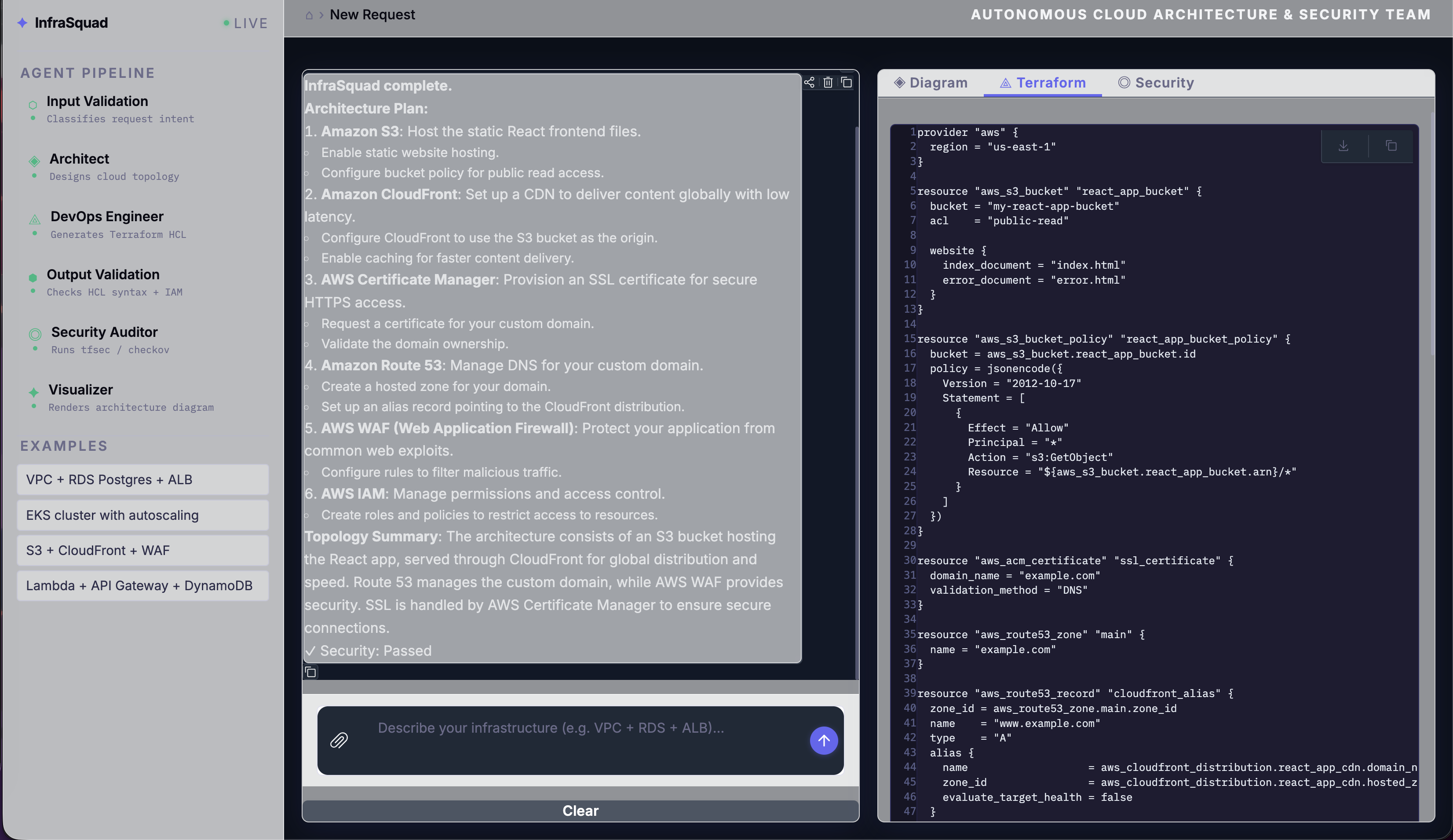
The DevOps agent follows the security baseline baked into its system prompt: S3 buckets get KMS encryption + versioning + public access block, RDS gets storage_encrypted = true + deletion_protection = true + 7-day backup retention, ElastiCache gets at_rest_encryption_enabled = true + transit_encryption_enabled = true, VPCs get aws_flow_log.
Architecture diagram:
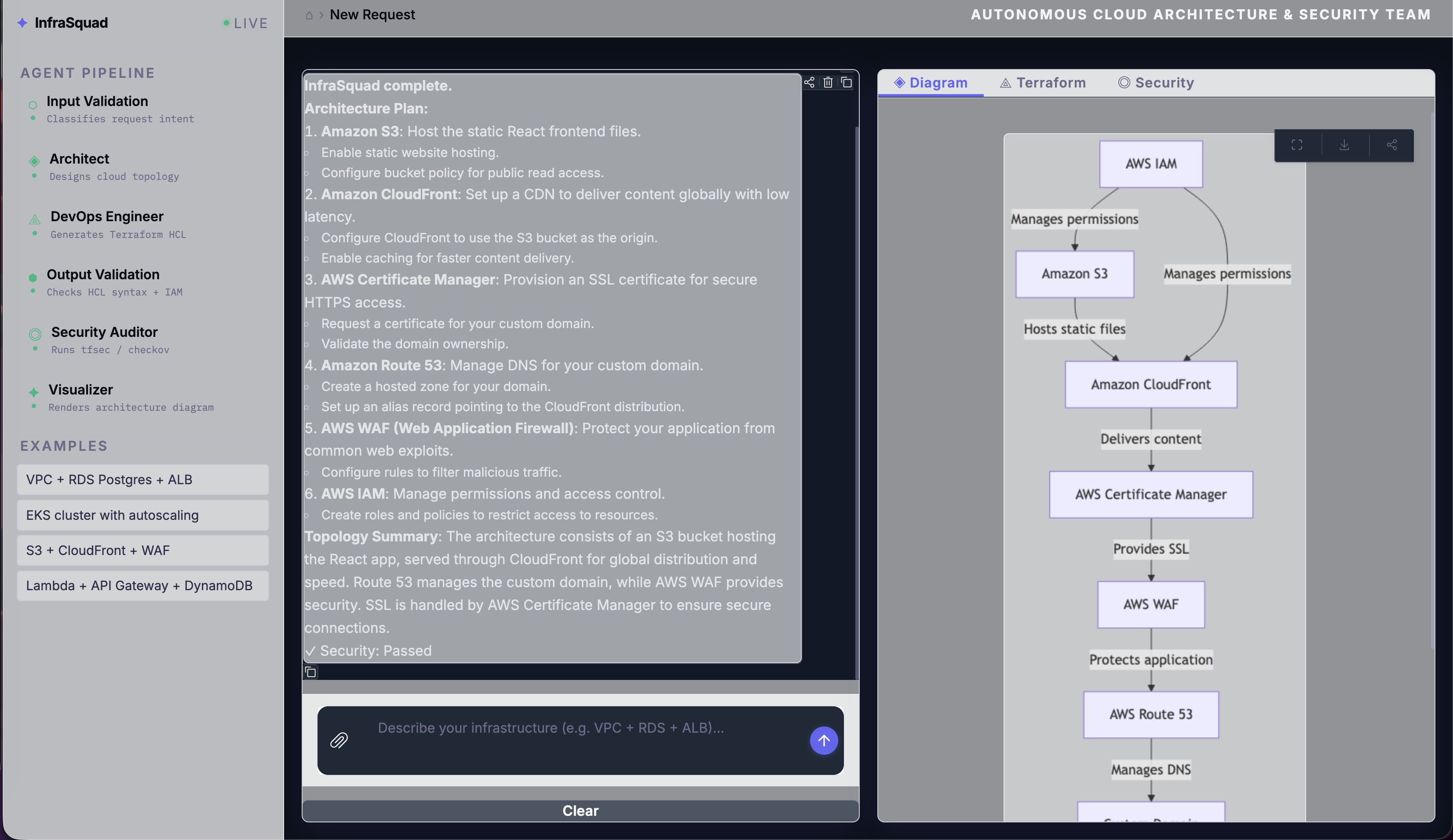
The Visualizer generates Mermaid flowchart syntax that accurately maps the services and data flow from the finalized architecture. If mmdc is installed, it renders to PNG; otherwise the source is saved and can be pasted directly into any Mermaid-compatible viewer.
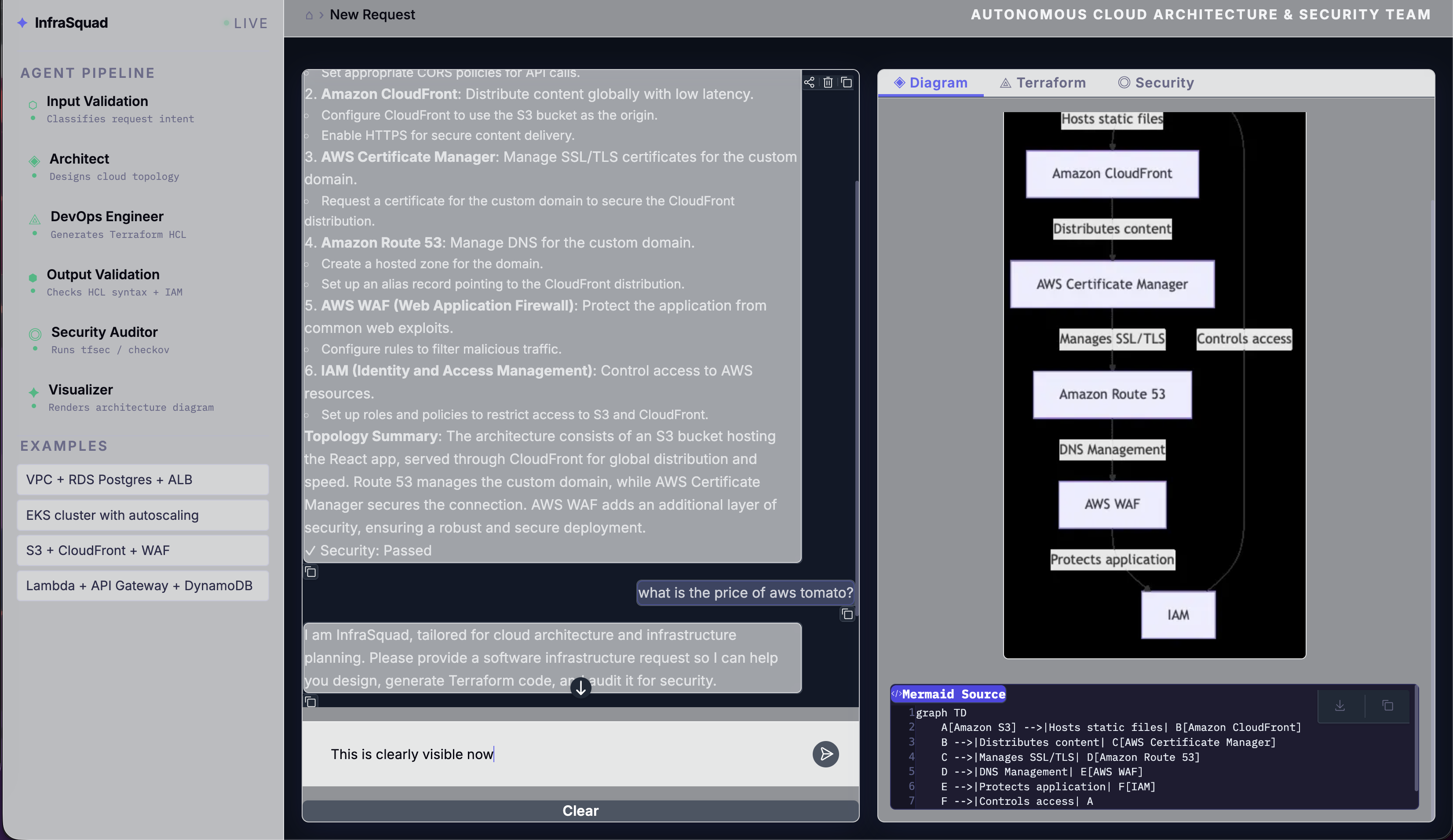
Guardrails in action:
Off-topic requests get a clean, helpful fallback - no LLM token waste, no confusing error:
Design Decisions We Argued About
The README has a table. Here’s the thinking behind each choice:
LangGraph over CrewAI/AutoGen
The security remediation loop is cyclic - the Security Auditor sends the DevOps Engineer back, which generates new code, which gets re-scanned. CrewAI’s role-based model and AutoGen’s conversation-driven approach both require workarounds for cycles. LangGraph’s state machine handles them natively with conditional edges. We also needed explicit retry caps and shared typed state across all agents - LangGraph gives both.
Typed state via TypedDict
Every agent reads from and writes to the same AgentState. Without a clear contract on what each agent receives and produces, integration bugs are silent - an agent gets None where it expected a string and fails downstream with a cryptic error. The TypedDict with total=False gives us the contract without requiring every field to be present at every stage.
Pydantic schemas for agent output
Every agent returns a Pydantic model, not a raw string. The LLM is prompted to return JSON matching a strict schema, and invoke_with_schema_retry retries up to three times if parsing fails. This eliminates an entire class of downstream errors - the DevOps agent’s Terraform is always a string; the Security Auditor’s findings are always a typed list of dicts with severity, resource, description, recommendation.
Keyword classifier for input, not just LLM
An LLM call for every first message adds ~2 seconds to every request, including the obvious ones (“VPC with RDS Postgres and ALB” is clearly valid). The keyword fast path skips this for high-confidence requests. The LLM plausibility check only fires for borderline single-keyword cases. In practice, about 70% of valid requests take the keyword fast path.
Regex IAM blocker separate from the HCL guardrail
AdministratorAccess and "Action": "*" are blocked by a hardcoded regex that runs independently. Even if the HCL guardrail somehow passes the code through (e.g., the IAM policy is in a JSON document block that the guardrail misses), the IAM check catches it. Two independent checks at the same level, neither relying on the other.
Running InfraSquad
git clone https://github.com/Andela-AI-Engineering-Bootcamp/infrasquad.git
cd infrasquad

# With uv (recommended)
uv venv && uv sync

# Or with pip
python -m venv .venv && source .venv/bin/activate && pip install -r requirements.txt
Copy .env.example to .env and add your OpenRouter API key:
OPENROUTER_API_KEY=sk-or-...
Launch the UI:
python app.py                # http://127.0.0.1:7860
python app.py --share        # public Gradio link
python app.py --port 8080    # custom port
The default model is openai/gpt-4o-mini via OpenRouter. You can swap to any model OpenRouter supports - or point it at a local Ollama instance - by changing LLM_MODEL and LLM_BASE_URL:
LLM_MODEL=anthropic/claude-3-5-sonnet
LLM_BASE_URL=https://openrouter.ai/api/v1

# Or local:
LLM_MODEL=qwen2.5:72b
LLM_BASE_URL=http://localhost:11434/v1
Install optional external tools for automated scanning and diagram rendering:
brew install tfsec         # macOS - preferred scanner
pip install checkov        # fallback scanner
npm install -g @mermaid-js/mermaid-cli  # diagram rendering
If none of these are installed, the system still works - security falls back to LLM review and diagrams are saved as Mermaid source.
Run the test suite:
pip install -e ".[dev]"
pytest -v
What We Learned
Cyclic graphs need hard caps immediately. During early testing, the security remediation loop ran indefinitely on certain findings the LLM couldn’t resolve - particularly AVD-AWS-0053 (public ALB), which is an accepted design decision, not a fixable bug. The pipeline would loop forever trying to fix something intentional. Hard-coding max_remediation_cycles = 3 was one of the first bug fixes after the first integration test.
The LLM will always try to add 0.0.0.0/0 for any internet-facing resource, regardless of what the system prompt says. The regex sanitizer (replacing it with 10.0.0.0/8) was more effective than any prompt engineering we tried. When a model consistently produces the same wrong output, the right fix is deterministic post-processing, not a better prompt.
Pydantic schema retry is load-bearing. Without it, agents fail silently when the LLM returns slightly malformed JSON - a missing field, a trailing comma, extra text before the {. With invoke_with_schema_retry, the pipeline retries with an error correction prompt (“Your previous response was not valid JSON: …”) before failing. In practice, this resolves about 80% of schema failures on retry 1.
Input validation saves more tokens than you’d expect. Chitchat and off-topic requests are common in demo environments. Every chitchat message that hits the architect burns tokens before returning a confusing error. The three-layer guardrail approach means only genuine infra requests reach the expensive part of the pipeline.
MCP as an isolation boundary is worth the overhead. We debated whether the MCP server was over-engineering for a hackathon-scale project. The argument for it: tfsec and mmdc are external processes that can timeout, crash, or produce unexpected output. Wrapping them in an MCP tool forces us to handle every failure mode explicitly rather than letting exceptions propagate into agent code. Every external dependency ended up with a fallback path.
The Full Stack
| Component | Tool | Version |
|---|---|---|
| Agent framework | LangGraph | 1.1.3 |
| LLM client | LangChain / langchain-openai | 1.2.13 / 1.1.12 |
| LLM gateway | OpenRouter | - |
| Default model | openai/gpt-4o-mini | - |
| MCP server | FastMCP (mcp Python SDK) | 1.26.0 |
| Diagram rendering | Mermaid.js via mmdc | 11.12.0 |
| UI | Gradio | 6.10.0 |
| Configuration | pydantic-settings | 2.13.1 |
| Security scanning | tfsec / checkov | - |
| LLMOps / Tracing | LangSmith | - |
| Testing | pytest | 9.0.2 |
| Package manager | uv | 0.10.9 |
| Runtime | Python | 3.12+ |
InfraSquad is open source. If you’re building something with LangGraph, multi-agent pipelines, or IaC automation - or if you just want to see what production-grade Terraform looks like when four AI agents argue about security compliance - the code is all there.
Star the repo: github.com/Andela-AI-Engineering-Bootcamp/infrasquad
Questions, findings, or war stories about cyclic LangGraph workflows? Drop them in the comments.
Built by the InfraSquad team at Andela AI Engineering Bootcamp - Amit, Ayesha, Elijah, Joel, Stella, and Adetayo.